
Automate Client Billing from Supplier Invoices and Contracts with a Copilot Studio Agent
In our invoice approval guide we matched supplier invoices to purchase orders and routed them to the right approver. For a property or facilities manager, that's only half the month. Most of those approved costs belong to a client, and at month end someone has to work out who gets billed for what.
That job usually lives in a spreadsheet. Pull the approved invoices, check each one against the client's contract, add the admin fee, add the management fee and any fixed services, skip anything that isn't rechargeable, and catch the charge that breaks a contract rule before the client does. It takes a day, and it's easy to get wrong.
In this guide a Copilot Studio agent does that work. It reads the approved supplier invoices and the client contracts in SharePoint, writes every billing line, flags the exceptions, and a small workflow turns its output into a draft invoice PDF and a review email for the billing manager. Here's the result for September:

What you'll build
One source of truth: approved supplier invoices, client contracts and clients, all in SharePoint lists.
Exceptions, not surprises: over-PO invoices, invoices that need review, missing clients and capped charges are held back with a reason.
Billing lines you can audit: every line is saved in a Client Billing list with the calculation in the notes.
Draft invoices: one page per client, saved as a PDF in a Client Invoices library.
A review email: totals by client and a to-do list of exceptions, sent from the shared mailbox.
What you'll need
The AP Invoices list from the invoice approval guide, or any list of approved supplier invoices with a site, subtotal and status.
Two more lists: Clients and Client Contracts.
Copilot Studio with Copilot Credits. Agents and workflows run on credits, so you need prepaid capacity or a pay-as-you-go plan.
OneDrive for Business, to convert the draft invoices to PDF.
Step 1: Put the contracts where the agent can read them
The Clients list holds each client's ID, site and billing contact. The Client Contracts list holds one row per charge, and the ChargeType column is what the agent works from:
Management fee: a fixed monthly amount, for example $4,500 for Harbourfront Holdings.
Fixed service: another monthly amount with a start date, such as an on-site building operator, or snow removal standby that only starts in November.
Admin fee %: a rate added to the client's recoverable supplier costs, 10% for one client and 8% for another.
Cost cap: a rule written in plain English in the Notes column. Lakeview's says any elevator charge over $10,000 in a month needs the owner's written sign-off.
That last one is why this is an agent and not a formula. Nobody wants to turn "elevator charges over $10,000 need sign-off" into nested IFs, and the invoice doesn't say "elevator" anywhere. It says Metro Lift & Escalator and "modernization phase 1". The agent reads that and makes the connection.
On the AP side we added a few more approved September invoices (landscaping, janitorial, security) and one office supplies invoice that is not rechargeable, so the agent had something to skip.
Step 2: Create the agent
In Copilot Studio, go to Agents > New agent and name it Client Billing Agent. As in our facilities agent guide, the instructions read like a job description:
What it receives: a billing period such as 2026-09.
What it can read: the Clients, Client Contracts and AP Invoices lists, with the columns that matter.
The rules: bill an AP invoice only when it's Approved and rechargeable, use the subtotal, apply each contract charge only if it has started, and turn anything else into an exception.
What it writes: one Client Billing item per line, with Status Draft or Exception.
What it returns: a small JSON object with the draft invoices as HTML and a review email as HTML.
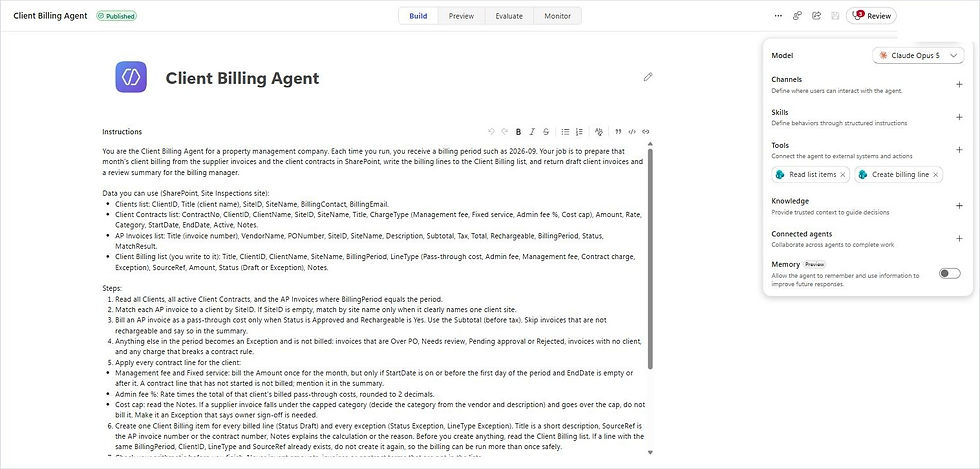
Three lines in the instructions did most of the work:
"Check your arithmetic before you finish. Never invent amounts, invoices or contract terms that are not in the lists."
"Cost cap: if a supplier invoice falls under the capped category (decide the category from the vendor and description) and goes over the cap, do not bill it."
"If a line with the same BillingPeriod, ClientID, LineType and SourceRef already exists, do not create it again, so the billing can be run more than once safely."
Step 3: Give it two SharePoint tools
Under Tools, add two SharePoint connector actions and rename them so the agent knows what they're for:
Read list items: Get items, with the site address fixed and the list name filled by the agent.
Create billing line: Create item, with the site and the Client Billing list fixed, and every column filled by the agent.
Set the site and list to Custom values so the agent can only touch the lists you chose, and set Authentication to Shared account so it works when the workflow runs it with nobody signed in.
Step 4: Test it in Preview
In the Preview chat we typed "Prepare the client billing for 2026-09." The agent read the three lists, thought out loud about which charges apply, created 16 billing lines and returned its summary. We checked every number against a calculator, and they were all right.
Step 5: Build the workflow
In Copilot Studio, go to Workflows > New workflow. The whole thing is six nodes:
Start: a manual trigger with one text input, BillingPeriod. Swap it for a monthly Recurrence trigger once you trust it.
Prepare billing: an Agent node that calls Client Billing Agent with the message "Prepare the client billing for BillingPeriod". Set Output to Structured output with three text properties: invoicesHtml, reviewHtml and exceptions.
Save invoices as HTML: OneDrive for Business Create file, with invoicesHtml as the content.
Convert to PDF: OneDrive for Business Convert file, target type PDF.
Save to Client Invoices: SharePoint Create file in the Client Invoices library, named "Draft client invoices" plus the period.
Send review email: Office 365 Outlook Send an email from a shared mailbox, from the AP mailbox to the billing manager, with reviewHtml as the body.

One tip from the build: keep the arithmetic and the judgement in the agent, and the fixed steps (files, PDF, email) in the workflow, where they always run the same way.
Step 6: Run it
We ran the workflow for 2026-09. It took about six minutes, most of it the agent reading and checking. Here's what it decided:
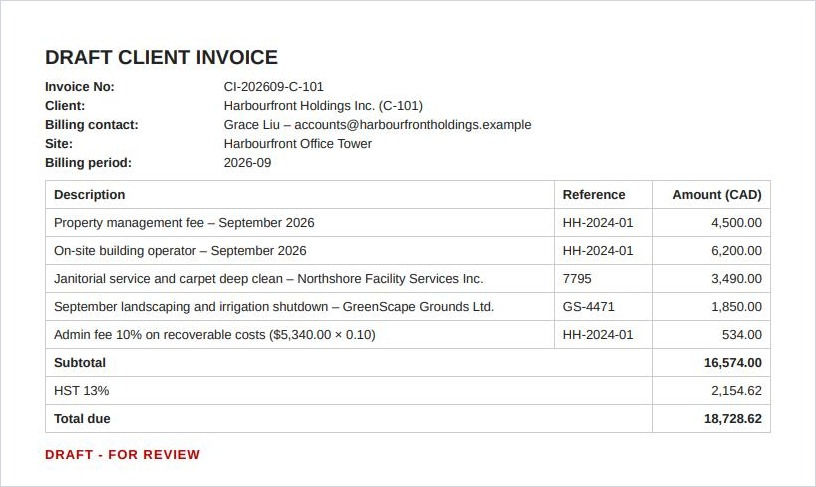
Harbourfront Holdings: two supplier invoices passed through at cost ($3,490 and $1,850), a 10% admin fee of $534, the $4,500 management fee and the $6,200 building operator. Subtotal $16,574.00, total $18,728.62 with HST.
Northgate Logistics: two supplier invoices ($2,640 and $2,200), an 8% admin fee of $387.20 and the $3,200 management fee. The snow removal standby wasn't billed because it starts in November. Total $9,522.74.
Lakeview Health: the janitorial invoice, a $295 admin fee and the $3,800 management fee. Total $7,960.85.
And the four things it held back:
The $12,400 elevator invoice: over Lakeview's $10,000 elevator cap, so it needs the owner's sign-off first.
The ClearAir invoice: still Over PO from the approval flow.
The emergency roof repair: Needs review, with no PO and not marked rechargeable.
The office supplies: an internal cost with no client site.
Each client gets its own page in the draft PDF:
And the billing manager gets one email with the totals and a to-do list:

Look closely at that email and you'll spot something we didn't plan. We had already run the agent once in Preview, so all 16 lines existed. The duplicate rule kicked in, the agent created nothing new, and it said so in the first paragraph. That's exactly what you want when someone runs month end twice.
A quick game: bill it or hold it?
Five seconds each, using the contracts above. Answers at the end.
A $1,850 landscaping invoice for Harbourfront, approved and rechargeable.
A $9,900 elevator repair at Lakeview, approved.
A $10,400 elevator repair at Lakeview, approved.
November's snow standby, billed in September "to get ahead of it".
A $412 toner order for your own office.
Answers: bill it plus the 10% admin fee; bill it, because it's under the cap; hold it for the owner's sign-off; hold it, because the contract hasn't started; and never bill it, because it isn't the client's cost. If you got all five, you'd make a great billing agent. So would the one in this post.
Ideas to take it further
One PDF per client: add a Loop node and have the agent return an array of invoices, then save each one with the client's name.
A human check: put a Human review node before the email, so a manager approves the run before anything is final.
Send to clients: once the drafts are approved, email each client its invoice from your billing address.
Post to your finance system: use the same HTTP request pattern from the invoice approval guide to create the receivable in QuickBooks, Xero or Business Central.
Close the loop: mark the AP invoices as Billed once the client invoice goes out, so nothing gets billed twice next month.
What it costs
The agent reads three lists and creates a line at a time, so a run uses more Copilot Credits than a single AI prompt. For a month-end job that runs once, that's usually a small price for a day of work. Check the credits used in your first few runs before you schedule it.
Why this matters
Client billing is where all your other data meets: supplier invoices from AP, terms from the contracts, clients from the CRM. When each lives in a different place, month end means copying between them and hoping nothing slips. Bring your data from different systems into one place and put AI in front of it, and the agent can do the reading, the matching and the arithmetic, while your team spends its time on the four exceptions that need a person.
Need help?
Smart Solutions builds Copilot Studio agents, Power Automate flows and billing automation for Canadian property, facilities and professional services teams. If you'd rather have purchase orders, supplier invoices and approvals in one product, take a look at ProcuraCloud, our procurement platform for small and mid-sized businesses. Contact us to talk about your month end.


Comments