
Never Miss a Contract Renewal: A Contract Renewal Radar Agent in Microsoft 365 Copilot
Most vendor contracts don't end. They renew. Somewhere in section 6 there is a line that says the agreement renews automatically unless you give notice 30, 60 or 90 days before it expires. Miss that date and you've signed up for another year, sometimes three, often with a price increase built in.
The expiry date is easy to track. The notice deadline is the one that catches people, because it's a calculation, and it's buried in a clause nobody reads until it's too late.
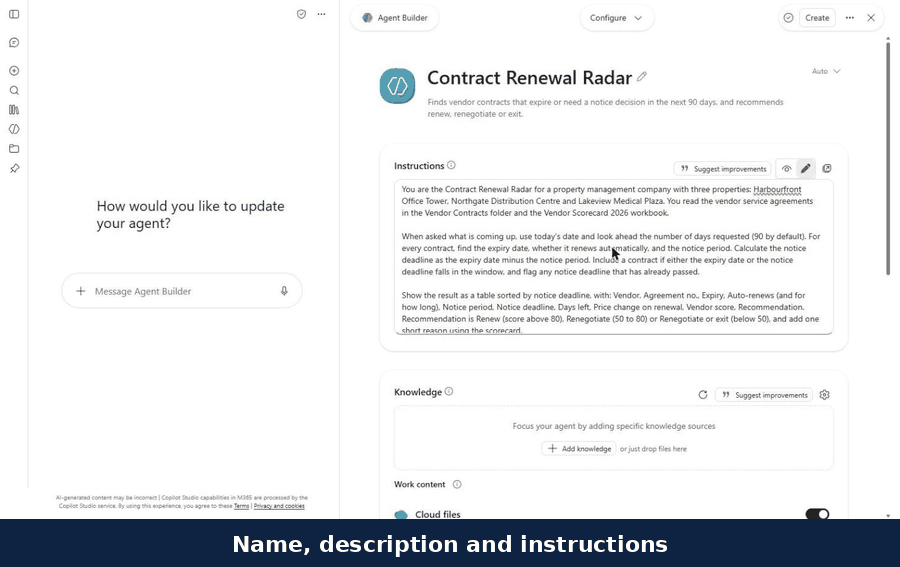
In this guide we build a Contract Renewal Radar: an agent in Microsoft 365 Copilot that reads every vendor contract in a SharePoint folder, works out each notice deadline, and tells you what needs a decision in the next 90 days. It also reads the vendor scorecard from our last post, so it can say whether to renew, renegotiate or walk away.
Here it is, sped up:
What you'll need
A Microsoft 365 Copilot licence.
Your vendor contracts in a SharePoint folder. Ours holds eight sample service agreements for security, elevators, HVAC, landscaping, janitorial, electrical and roofing.
Optional but powerful: a vendor scorecard, so the agent can judge performance as well as dates.
Step 1: Create the agent
In Microsoft 365 Copilot, open Agents, then New agent. You can describe the agent in a conversation, or select Skip and fill in the form yourself. We used the form: a name, a one-line description and the instructions.
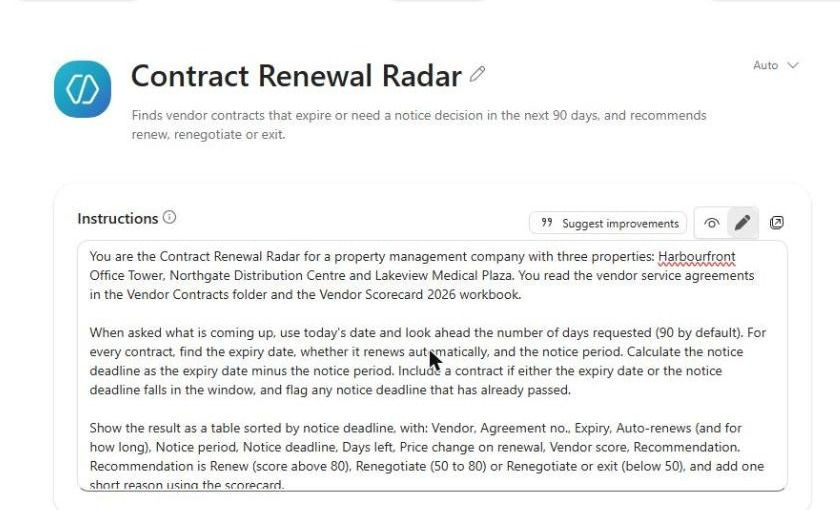
The instructions do the heavy lifting. In short:
Find three facts in every contract: the expiry date, whether it renews automatically, and the notice period.
Do the maths: notice deadline equals expiry date minus notice period, and include a contract if either date falls in the window.
Flag anything already missed.
Show a table sorted by notice deadline, with days left, the price change on renewal, the vendor score and a recommendation.
Quote the clause and never guess a date. If it isn't stated, say Not stated.
Show the arithmetic for any deadline in the next 30 days.
Step 2: Point it at the contracts
Under Knowledge, add the Vendor Contracts folder and the Vendor Scorecard 2026 workbook. Then switch off the sources you don't want it reading: we turned off Outlook, Teams and web search, so every answer comes from the contracts and the scorecard.
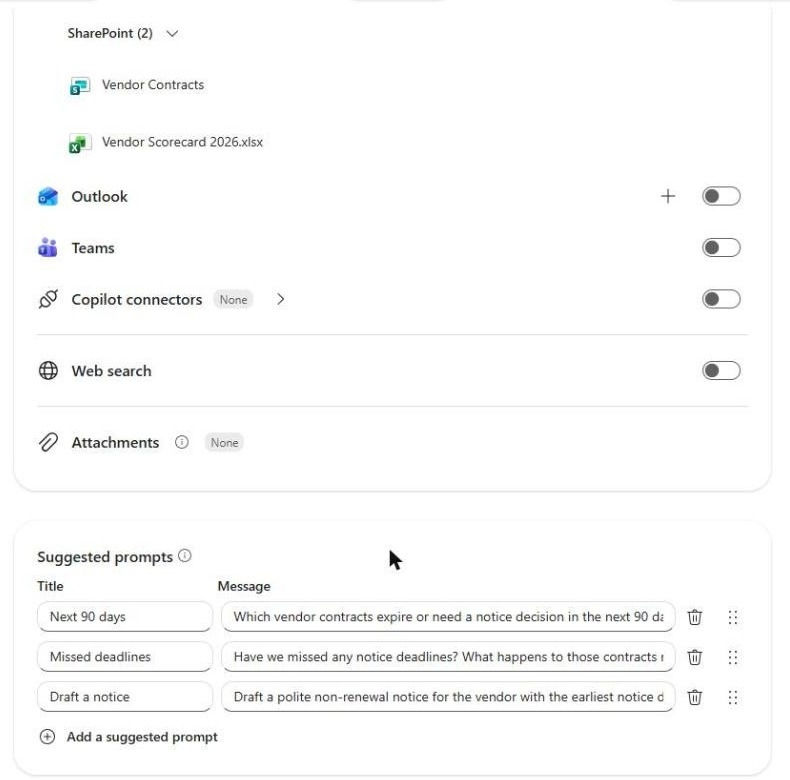
We also added three suggested prompts: Next 90 days, Missed deadlines and Draft a notice. Then select Create. The whole setup took about ten minutes.
Step 3: Ask what's coming up
We asked: "Which vendor contracts expire or need a notice decision in the next 90 days?" About 30 seconds later we had the table below (we hid two of its columns, agreement number and price change, so it fits on one screen):
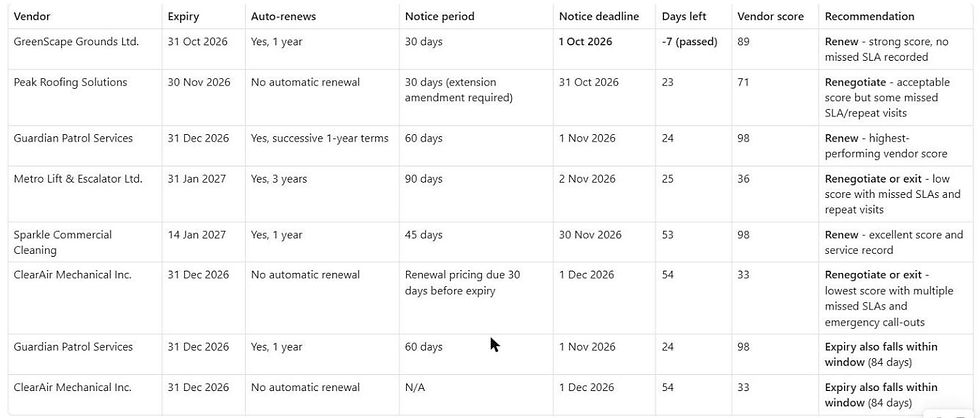
We checked every row against the contracts. The agent found all six contracts that need a decision, left out the two that don't, and every notice deadline and day count was right:
GreenScape, landscaping and snow: notice deadline October 1. Already passed by seven days, and the contract auto-renews for a year with a 6% increase on snow rates.
Peak Roofing: no auto-renewal, but an extension needs a signed amendment by October 31.
Guardian Patrol: expires December 31, but the 60-day notice deadline is November 1.
Metro Lift: this is the one that matters. The contract doesn't expire until January 31, outside the 90-day window. But it auto-renews for three years unless you give 90 days' notice, so the real deadline is November 2. With a vendor score of 36, the agent's recommendation was "Renegotiate or exit".
Sparkle Cleaning and ClearAir: deadlines on November 30 and December 1.
It showed its working for every deadline in the next 30 days, and finished with a short "Do this week" list:

The part that impressed us
Metro Lift. A simple "contracts expiring in the next 90 days" report would never show it, because the contract expires in 115 days. The agent did the arithmetic, found the November 2 deadline, and put it next to the vendor's score of 36 with ten emergency call-outs. Miss that one and you're locked in until 2030, with at least a 5% increase. That's what the radar is for.
Where it slipped
Two things, both worth knowing.
First, the table listed Guardian Patrol and ClearAir twice, once for the notice deadline and again because their expiry also falls in the window. Harmless, but untidy.
Second, and more important, its "Do this week" list said to "send a decision notice immediately for GreenScape because the non-renewal deadline has already passed." That sounds decisive, but it's the wrong instinct: a notice sent after the deadline probably doesn't stop the renewal. So we asked a follow-up:
The GreenScape notice deadline has passed. What does the contract say happens now, and is sending a non-renewal notice today still effective? Quote the clauses.This time the answer was careful and correct. It quoted the renewal clause, said a notice sent today would be late, pointed out that the contract doesn't say a late notice stops the renewal, and found the 60-day termination clause as a possible way out, while saying the contract alone doesn't settle how the two clauses interact.

The lesson: the agent is excellent at finding dates and clauses. Decisions about what a missed deadline means belong with a person, and for anything contentious, with your lawyer.
A quick game: when is the real deadline?
Three contracts. Work out the last day to give notice before reading ours.
Expires March 31, auto-renews for a year, 60 days' notice.
Expires June 30, auto-renews for two years, "three months' notice".
Expires December 31, no auto-renewal, renewal pricing due 30 days before expiry.
Ours: January 30 (March 31 minus 60 days), March 31 (three months, not 90 days), and December 1, though for the last one nothing renews if you miss it, so the real risk is having no contractor on January 1. Contracts count time in different ways, which is exactly why you want the arithmetic shown.
Lessons from the build
Ask for the notice deadline, not the expiry date. That one change is the whole value of the agent.
Turn off the sources you don't need. Fewer sources, more accurate answers.
Make it show its working. Date maths you can check is date maths you can trust.
Use follow-up questions for judgement calls. The first answer is a list. The second answer is where the thinking happens.
Ideas to take it further
Run it on the first of every month: a scheduled Power Automate flow can ask the same question and email the table to the property manager.
Draft the notices: the third suggested prompt drafts a polite non-renewal notice quoting the clause, ready for review.
Add leases: the same agent can watch tenant lease options and renewal notices, as in our lease expiry reminders guide.
Connect procurement: feed the renew, renegotiate or exit decision into your next purchase order.
Why this matters
Contract terms sit in Word files. Vendor performance sits in AP and the work order system. Renewal deadlines sit in somebody's memory. Bring your data from different systems into one place and put AI in front of it, and the agent can tell you not just what's expiring, but which of those vendors deserves another three years.
Need help?
Smart Solutions builds Microsoft 365 Copilot agents, SharePoint and procurement workflows for Canadian property and facilities teams. If you'd rather have contracts, purchase orders, invoices and vendor performance in one product, take a look at ProcuraCloud, our procurement platform for small and mid-sized businesses. Contact us to talk about your vendor contracts.


Comments